
ランダムに映画を紹介する!
ランダムに映画を紹介するWebアプリ「えいがちゃ」を作りました!

条件を設定して(しなくても)、ボタンを押すだけで、映画を紹介してくれます!
この記事では、
このアプリを作ろうと思ったきっかけ、どのようなアプリか、どのように作ったのか
を紹介していきます!
きっかけ
みなさんは映画はお好きですか?
最近はNetflixであったり、AmazonPrimeVideoであったり、サブスクリプションのサービスが発達して、気軽に映画を楽しめるようになりました。
今まで観た映画の中から、おすすめを表示してくれたり、映画の評価をみれたりします。
しかし、そんな”自分に合いそうなもの”から外れて、もっと幅広い映画と出会ってみませんか?
昔、私が中学生だった頃、サブスクリプションのサービスに入っておらず、映画をみようすれば、テレビで金曜ロードショーなどをみるか、
GEOやTSUTAYAのようなレンタルビデオ屋さんにDVDを借りに行くという二択でした。
そこには自分がこれまでにどんな映画を観たのかというフィルタ、
評価が高い低いといったフィルタがありませんでした。
フラフラとレンタルビデオ屋さんを散歩して、
「こんな面白そうな映画があるのか~」
とDVDの裏表紙だけを見て、借りて映画を見たものです。
アカデミー賞を取ったものであれ、B級映画と呼ばれているものであれ関係なく!
そんな風に素敵な映画に出会って欲しいという思いで、この「えいがちゃ」というWebアプリを作りました!
どのようなアプリ?
この「えいがちゃ」というアプリは、TMDbというデータベースからランダムに映画を出力することができます。

こちらがアプリの画面となっています。
スクリーンがピカピカ光っているガチャガチャのアニメーションが大きく表示されています。(こだわりポイントですね…!)
使い方はいたってシンプルです。
「検索開始年月日」、「検索終了年月日」、「最低評価」、「最低評価数」の入力欄に条件を入力します。
これらを入力することで、古すぎる映画、面白くなさすぎる映画、評価の数が少なく適正な評価ができていない映画を検索から除外することができます。
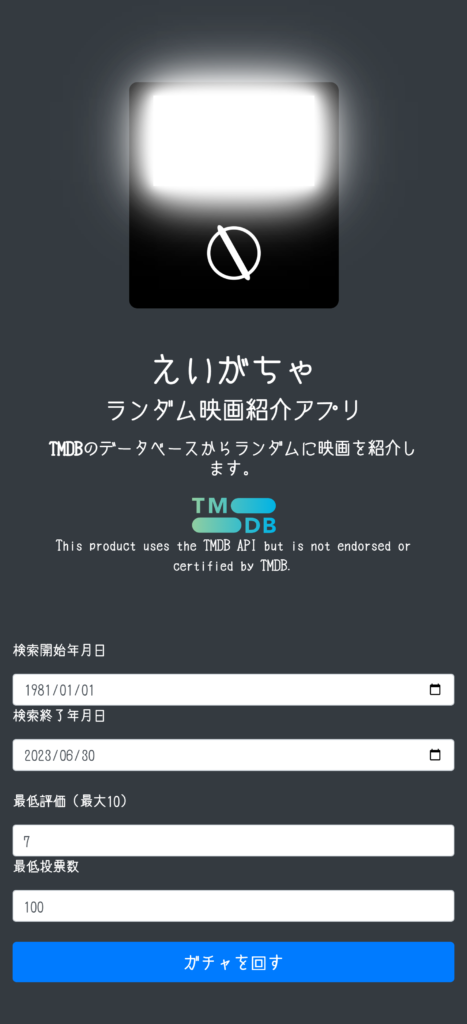
また、「今日は80年代の映画から探そう~!」といった遊びもできます。
そして条件を入力後、「ガチャを回す」のボタンを押すだけです!

ローディング画面が出てきて、
映画の情報が出力されます!
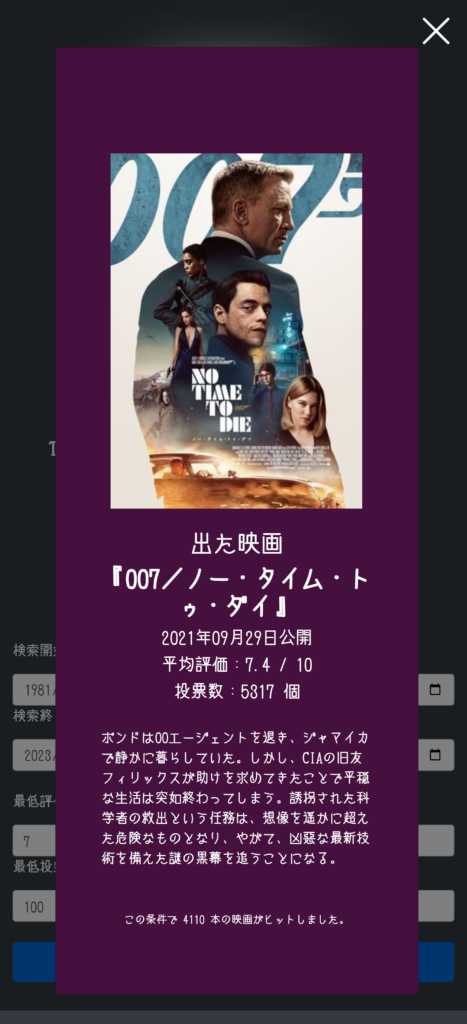
下のほうにどれくらいの数の映画が条件からヒットしたかも表示されます。
ここで映画のジャケット写真かタイトルをクリックすると、「JustWatch」に飛んで、どのサブスクリプションのサービスで観ることができるかが一目でわかります。
どのように作ったのか?
ソースコード
index.html
<!DOCTYPE html>
<html lang = "ja">
<meta http-equiv="Content-Type" content="text/html; charset=UTF-8">
<meta name="viewport" content="width=device-width, initial-scale=0.7, user-scalable=no">
<!-- Bootstrap CSS -->
<link rel="stylesheet" href="https://stackpath.bootstrapcdn.com/bootstrap/4.1.3/css/bootstrap.min.css" integrity="sha384-MCw98/SFnGE8fJT3GXwEOngsV7Zt27NXFoaoApmYm81iuXoPkFOJwJ8ERdknLPMO" crossorigin="anonymous">
<!-- Bootstrap Javascript(jQuery含む) -->
<script src="https://code.jquery.com/jquery-3.3.1.slim.min.js" integrity="sha384-q8i/X+965DzO0rT7abK41JStQIAqVgRVzpbzo5smXKp4YfRvH+8abtTE1Pi6jizo" crossorigin="anonymous"></script>
<script src="https://cdnjs.cloudflare.com/ajax/libs/popper.js/1.14.3/umd/popper.min.js" integrity="sha384-ZMP7rVo3mIykV+2+9J3UJ46jBk0WLaUAdn689aCwoqbBJiSnjAK/l8WvCWPIPm49" crossorigin="anonymous"></script>
<script src="https://stackpath.bootstrapcdn.com/bootstrap/4.1.3/js/bootstrap.min.js" integrity="sha384-ChfqqxuZUCnJSK3+MXmPNIyE6ZbWh2IMqE241rYiqJxyMiZ6OW/JmZQ5stwEULTy" crossorigin="anonymous"></script>
<head>
<meta charset = "utf-8">
<title>えいがちゃ</title>
<link rel="icon" href="logo.svg">

<link rel="stylesheet" href="style.css">
</head>
<body class="bg-dark">
<script src="script.js"></script>
<div class="container">
<div class="px-4 py-5 mt-5 text-center" id="top_wrapper">
  <div class="gacha_shape py-3 mx-auto ">
		<div class="screen mx-auto"></div>
	<svg class="svg mx-auto" width="192" height="140" >
<circle class="circle" cx="96" cy="80" r="30" />
<rect class="handle" x="92" y="43" width="8" height="75" rx="10" />
</svg></div><br><br>
	<div class="col-lg-6 mx-auto">
      <h1>えいがちゃ</h1>
        <h3 class="mb-4">ランダム映画紹介アプリ</p>
		  <p class="lead mb-4"><a href="https://www.themoviedb.org/">TMDB</a>のデータベースからランダムに映画を紹介します。</p>
		 <div class="row"><a  class="col-md-3 h-50 my-auto"  href="https://www.themoviedb.org/"><img src="https://www.themoviedb.org/assets/2/v4/logos/v2/blue_square_1-5bdc75aaebeb75dc7ae79426ddd9be3b2be1e342510f8202baf6bffa71d7f5c4.svg" width="100px"></a><div class="col-md-9 h5"><small>This product uses the TMDB API but is not endorsed or certified by TMDB.</small></div></div>
  </div>
</div>
<div class="row">
	<div class="col-md-6">
	<p>検索開始年月日</p>
	<input class="form-control ms-1" id="relese_date_start" type="date"  min="1895-12-28" value="1895-12-28"></div>
	<div class="col-md-6">
	<p>検索終了年月日</p>
	<input class="form-control ms-1" id="relese_date_finish" type="date" min="1895-12-28"></div>
    </div><br>
<div class="row">
	<div class="col-md-3">
	<p>最低評価(最大10)</p>
	<input class="form-control ms-1" id="min_rate" type="number" value="0" step="0.1" min="0" max="10"></div>
	<div class="col-md-3">
	<p>最低投票数</p>
	<input class="form-control ms-1" id="min_count" type="number" value="0" step="1" min="0"></div>
</div><br>
<input class="btn btn-primary btn-lg w-100" type="button" value="ガチャを回す" onclick="output()" />

<!-- モーダル本体 -->
<div class="modal-container">
	<div class="modal-body">
		<!-- 閉じるボタン -->
		<div class="modal-close">×</div>
	  <div class="modal-content">
	<div class="px-4 py-5 mt-5 text-center">
	<div id="gacha_wrapper">
	<div class="gacha_shape py-3 mx-auto">
		<div class="screen mx-auto"></div>
	<svg class="svg mx-auto" width="192" height="140">
<circle class="circle" cx="96" cy="80" r="30" />
<rect class="handle" x="92" y="43" width="8" height="75" rx="10" />
</svg></div></div><span title="JustWatchで検索"><a class="search" href="#"  target="_blank"><img class="mx-auto" id="main_img"  src="#"></a></span><br>
<div class="output_screen"><h3>出た映画</h3>
<h3 id="movie_title"><span title="JustWatchで検索"><a class="search" href="" target="_blank"></a></span></h3>
<h5 id="release_date"></h5>
<h5 id="vote_average"></h5>
<h5 id="vote_count"></h5><br>
<div class="text-left" id="movie_overview"></div>
<br><br>
<small class="text-left" id="search_log"></small></div>
		</div>
	</div>
</div>
</body>
</html>
主にbootstrapを用いてレイアウトを作りました。
入力フォームも勝手にいい感じになるので好きですね
これによりモーダルウィンドウも簡単に組み込むことができました。
参考にしたサイト


style.css
@font-face
{
font-family: しねきゃぷしょん;
src: url('https://cdn.leafscape.be/cinecaption/cinecaption227.woff2')
     format("woff2");
}
body{
	background: gray;
	color:white;
	font-family: しねきゃぷしょん;
	}
.container{
    align-items: center;
	justify-content: center;
    vertical-align: middle;
	margin-top:50px;
	margin-bottom: 50px;
}
a{
	color:white;
	font-weight: bold;
	-webkit-tap-highlight-color: transparent;
	cursor:pointer;
}
/*ガチャガチャの描写・アニメーション*/
.gacha_shape{
	background: black;
	width: 250px;
  	height: 270px;
	stroke-width: 4px;
	border-radius: 10px;
}
.circle {
  stroke: white;
  stroke-width: 4px;
  fill:transparent;
}
.handle{
  fill:white;
}
.svg{
  transform-origin:center 80px 0;
  animation:5s linear infinite rotation;
}
/*Neon*/
.screen {
  background: white;
  width: 192px;
  height: 108px;
  text-align: center;
  margin-bottom: 0;
  margin-top: 0;
  color: #fff;
  animation: neon1 1.5s ease-in-out infinite alternate;
}
#main_img{
	max-width: 300px;
	width: 100%;
  	height: auto;
	display:none;
	animation: fadein 1s ease 0s 1 forwards;
}
.output_screen{
	display:none;
	animation: fadein 1s ease 0s 1 forwards;
}
/*モーダル本体の指定 + モーダル外側の背景の指定*/
.modal-container{
	position: fixed;
	top: 0;
	left: 0;
	width: 100%;
	height: 100%;
	text-align: center;
	background: rgba(0,0,0,50%);
	padding: 40px 20px;
	overflow: auto;
	opacity: 0;
	visibility: hidden;
	transition: .3s;
    box-sizing: border-box;
}
/*モーダル本体の擬似要素の指定*/
.modal-container:before{
	content: "";
	display: inline-block;
	vertical-align: middle;
	height: 100%;
}
/*モーダル本体に「active」クラス付与した時のスタイル*/
.modal-container.active{
	opacity: 1;
	visibility: visible;
}
/*モーダル枠の指定*/
.modal-body{
	position: relative;
	display: inline-block;
	vertical-align: middle;
	max-width: 700px;
	width: 90%;
}
/*モーダルを閉じるボタンの指定*/
.modal-close{
	position: absolute;
	display: flex;
    align-items: center;
    justify-content: center;
	top: -25px;
	right: -25px;
	width: 40px;
	height: 40px;
	font-size: 40px;
	color: #fff;
	cursor: pointer;
}
/*モーダル内のコンテンツの指定*/
.modal-content{
	background: #45103E;
	text-align: left;
	padding: 30px;
	width: 100%;
  	height: auto;
}
/*アニメーションの定義*/
@keyframes neon1 {
  from {
    box-shadow: 0 0 10px #fff, 0 0 20px #fff, 0 0 30px #fff, 0 0 40px #ffffff,
      0 0 70px #ffffff, 0 0 80px #ffffff, 0 0 100px #ffffff, 0 0 150px #ffffff;
  }
  to {
    box-shadow: 0 0 5px #fff, 0 0 10px #fff, 0 0 15px #fff, 0 0 20px #ffffff,
      0 0 35px #ffffff, 0 0 40px #ffffff, 0 0 50px #ffffff, 0 0 75px #ffffff;
  }
}
@keyframes rotation{
  0%{ transform:rotate(0);}
  100%{ transform:rotate(360deg); }
}
@keyframes fadein {
  0% {
    transform: scale(0);
    opacity: 0;
  }
  100% {
    opacity: 1;
    transform: scale(1);
  }
}
@keyframes fadeout {
  0% {
    opacity: 1;
  }
  100% {
    opacity: 0;
  }
}
/*ローディング中のガチャガチャのアニメーション*/
#gacha_wrapper svg{
	animation:0.5s linear infinite rotation;
}
#gacha_wrapper{
	display:block;
}
#gacha_wrapper.fadein{
	animation: fadein 2s ease 0s 1 forwards;
}
#gacha_wrapper.fadeout{
	animation: fadeout 2s ease 0s 1 forwards;
}
ガチャガチャのアニメーション
ガチャガチャのアニメーションは、光るスクリーンと回るハンドルが動く部分となっています。
光るスクリーンは明るくなったり暗くなったりするアニメーションをループさせました。
参考にしたサイト

ハンドル部分はHTMLの方でSVGを描いて回しました。
回転の中心がずれると変な動きになってしまうので、調整がかなりめんどくさかったです。
多分もっといい方法があるんだろうな…
フォント
このアプリは映画をテーマとしているのでフォントもこだわりました。
「しねきゃぷしょん」という映画字幕のようなフォントを使用しました。
参考にしたサイト

script.js
// 今日の日付取得
window.onload = function () {
    var today = new Date();
    today.setDate(today.getDate());
    var yyyy = today.getFullYear();
    var mm = ("0" + (today.getMonth() + 1)).slice(-2);
    var dd = ("0" + today.getDate()).slice(-2);
    document.getElementById("relese_date_start").max = yyyy + '-' + mm + '-' + dd;
	document.getElementById("relese_date_finish").value = yyyy + '-' + mm + '-' + dd;
	document.getElementById("relese_date_finish").max = yyyy + '-' + mm + '-' + dd;
  }
$(function(){
	// 変数に要素を入れる
	var open = $('.btn'),
		close = $('.modal-close'),
		container = $('.modal-container');
	// 開くボタンをクリックしたらモーダルを表示する
	open.on('click',function(){
		container.addClass('active');
		return false
	});
	// 閉じるボタンをクリックしたらモーダルを閉じる
	close.on('click',function(){
		container.removeClass('active');
		setTimeout(()=>{
		$('#gacha_wrapper').css('display','none');
		$('#main_img').css('display','block');
		$('.output_screen').css('display','block');},200)
	});
	// モーダルの外側をクリックしたらモーダルを閉じる
	$(document).on('click',function(e) {
		if(!$(e.target).closest('.modal-body').length) {
			container.removeClass('active');
			setTimeout(()=>{
				$('#gacha_wrapper').css('display','none');
				$('#main_img').css('display','block');
				$('.output_screen').css('display','block');},200)
		}
	});
});
// 映画検索&出力
function output() {
	var close = $('.modal-close'),
		container = $('.modal-container');
	close.on('click',function(){
		container.removeClass('active');
		clearTimeout(loading);
		clearTimeout(output_animation);
	});
	// モーダルの外側をクリックしたらモーダルを閉じる
	$(document).on('click',function(e) {
		if(!$(e.target).closest('.modal-body').length) {
			container.removeClass('active');
			clearTimeout(loading);
			clearTimeout(output_animation);
		}
	});

	// 映画検索
	let Apikey = " "; //APIキーを記入してください。

	// フォームに入力した条件を変数へ
	let relese_date_start=$('#relese_date_start').val();
	let relese_date_finish=$('#relese_date_finish').val();
	let min_rate=$('#min_rate').val();
	let min_count=$('#min_count').val();
	let max_pages=500; //取得ページ数の限界値の500に設定

	// APIにリクエスト
	fetch(`https://api.themoviedb.org/3/discover/movie?api_key=${Apikey}&language=ja-JP&sort_by=popularity.desc&include_adult=false&include_video=false&page=1&primary_release_date.gte=${relese_date_start}&primary_release_date.lte=${relese_date_finish}&vote_count.gte=${min_count}&vote_average.gte=${min_rate}&with_watch_monetization_types=flatrate`)
    .then(res => {
       res.json().then(movie1 => {
       console.log(movie1);
	if(movie1.total_pages<500){ //ページ数が500未満の場合は取得したページ数で更新
		max_pages=movie1.total_pages
	};
	let select_page= Math.floor( Math.random() * (max_pages + 1)) ; //ランダムにページを選択

    // 選択したページでAPIにリクエスト
	fetch(`https://api.themoviedb.org/3/discover/movie?api_key=${Apikey}&language=ja-JP&sort_by=popularity.desc&include_adult=false&include_video=false&page=${select_page}&primary_release_date.gte=${relese_date_start}&primary_release_date.lte=${relese_date_finish}&vote_count.gte=${min_count}&vote_average.gte=${min_rate}&with_watch_monetization_types=flatrate`)
    .then(res => {
        res.json().then(movie2 => {
			console.log(movie2);
			let max_count=movie2["results"].length; // ページ内の結果数(映画数)を取得
			let select_count=Math.floor( Math.random() * max_count); // ランダムに映画を選択
			let date= movie2["results"][select_count]["release_date"];
			let date_array=date.split('-');
			let movie_title=movie2["results"][select_count]["title"];
			let search_movie_title=movie_title.replace("/\s+/g","%20");

			// 取得した結果をHTMLで表示
		    $('#main_img').attr('src',`https://image.tmdb.org/t/p/w300${movie2["results"][select_count]["poster_path"]}`);
		    $('#movie_title a').text(`『${movie_title}』`);
			$('#release_date').text(date_array[0]+"年"+date_array[1]+"月"+date_array[2]+"日公開");
			$('#vote_average').text(`平均評価:${movie2["results"][select_count]["vote_average"]} / 10`);
			$('#vote_count').text(`投票数:${movie2["results"][select_count]["vote_count"]} 個`);
		    $('#movie_overview').text(`${movie2["results"][select_count]["overview"]}`);
			$(".search").attr("href", `https://www.justwatch.com/jp/%E6%A4%9C%E7%B4%A2?q=${search_movie_title}`) //JustWatchで検索
			if(movie2.total_results>=10000){
				$("#search_log").text(`この条件で ${movie2.total_results} 本の映画がヒットしました。その中の上位1万本から1本を出力しています。`)
			}else{
				$("#search_log").text(`この条件で ${movie2.total_results} 本の映画がヒットしました。`)
			}
       });
    })})})
    .catch(error => {
      console.error(error);
    });

	  // ローディング中のアニメーション
	  $('#gacha_wrapper').css('display','block');
	  $('#main_img').css('display','none');
	  $('.output_screen').css('display','none');
	  target = document.getElementById("gacha_wrapper");
	  target.className = "fadein";
	  let loading=setTimeout(()=>{
      if (target.className == "fadein") {
        target.className = "fadeout";
      } else {
        target.className = "";
      }
	 }, 3000);

	// 映画情報表示
	let output_animation=setTimeout(()=>{
      if (target.className == "fadeout") {
        $('#gacha_wrapper').css('display','none');
		$('#main_img').css('display','block');
		$('.output_screen').css('display','block');
		return
      } else {
        target.className = "";
      }
	 }, 4000);
    }
今日の日付取得
最初に読み込む時に今日の日付を取得します。
これは「検索終了年月日」の上限になります。
参考にしたサイト

ランダムに映画を選択
「ガチャを回す」ボタンを押すと、処理が始まります。
APIにリクエスト送って返ってきたJSONからランダムに映画を選んで表示するような流れとなっています。
APIには2回リクエストを送っていいます。
1回目はどれくらいのページ数(1ページあたり20個の結果が格納)がヒットするかの確認用で、2回目は確認したページ数からランダムにページを選択して結果を絞っています。
(本当は一回でできたらいいんですけど・・・)
そして、1ページには20個の結果が格納されているので、次は0~19の値をランダムで選んで、映画を出力します。
コンソールで返値のJSONをみたときは以下の図のようになっています。

みなさんが素晴らしい映画と出会い、素敵な映画体験ができることを願っています…!


コメント